Minimizing Recertifications
Every effort should be made to ensure that the original certified FEC is correct. Recertified FECs are often the focus of auditors and can become an audit concern.
To minimize the need to recertify, the original FEC should be carefully reviewed before it is certified by the faculty member. If the salary distribution presented on the FEC does not reasonably reflect actual effort, changes should be made in MyFD, FIN, Payroll and/or the eFECS Cost Share Module prior to certifying the FEC.
For retroactive salary expense transfers made in MyFD or requests sent via Grant Tracker for modifications to commitments in the Cost Share Module, the department should process the appropriate adjustments(s) and wait overnight for the change(s) to process and post. eFECS will display an updated FEC reflecting the changes made the following business day.
Adjustments made in Payroll will be displayed in eFECS after the payroll has posted for the next pay period. To view salary transfers that affect your faculty but that were completed by another department see MyFD Transaction Summary Report and Copies of Salary Transfers.
When is Recertification Not Necessary
FEC recertifications present an audit risk to the University and should only be processed when absolutely necessary. The following adjustments do not require recertifications, therefore MAA will not approve/process recertifications received for these occurrences:
- Transfers between parent and sub budgets (or between sub budgets) of the same project
- Transfers between continuation budgets of the same project
- Adjustments which impact sponsored budgets by less than 1% (unless adding a new budget not previously reflected)
Recertification Steps for FECs Electronically Certified within eFECS
Beginning 3/7/2017, eFECS started to accommodate online recertifications. After this date all recertifications will be processed online. Exceptions apply only to FECs that were previously certified or recertified outside of eFECS. Any recertifications of those FECs must still be completed on paper, outside of eFECS.
"View FEC with post certification changes for recertification analysis"(shown below) will be retained to assist departments by displaying changes for FEC reporting period (salary transfers, cost share adjustments etc.) that were processed after the FEC was certified online. This view does not show any changes made directly on the FEC prior to certification, such as comments or cost share adjustments.
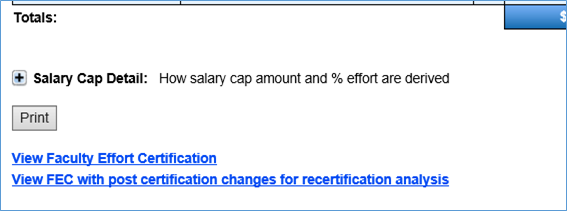
Note: FEC Coordinators responsible for preparing the recertification must have the "View and Update Effort Report" authorization set up in ASTRA. This is the same ASTRA permission required to enter comments or cost share adjustments on an online FEC.
Steps:
- Make the required change(s) in MyFD, FIN, Workday/Payroll and/or the Cost Share Module.
- Log into eFECS and navigate to the FEC to be recertified.
- Select the Change Status button on the FEC, change the status to Pending Recertification, and click the Save button. The status displayed on the FEC will automatically update, and the updated status will be reflected on My Faculty List the next time you refresh that page.

- On the certified FEC, find and click the green link View Recertifiable FEC, below the FEC’s salary information. This new link replaces the View FEC with post certification changes for recertification analysis link when the FEC status is changed to Pending Recertification, as in the step above.

- Confirm all changes have posted and the FEC now reflects the faculty member’s true effort. Re-enter any comments or cost share adjustments that were entered on the original FEC if they still apply. You can enter Short Term Shift or K award cost share, or adjust any committed cost share or salary cap cost share. Click the Edit Comments or Adjust/View Cost Share button to make such changes.

- Click the Justify Recertification button and enter an explanation of why the faculty member originally certified that the effort was correct and is now changing the effort. The justification should include the budget numbers of all affected sponsored budgets. The justification must be entered and saved before you can proceed to the next step. For help on the recertification justification, click here.
- Click the Change Status button again and change the FEC status to Ready for MAA Review. At this point, the Change Status button will be the only available button on the FEC and so no other changes can be entered on the FEC. However, relevant changes made outside of the eFECS system will appear on the recertifiable FEC. If further direct edits to the FEC are necessary, change the status back to Department Analysis in Progress.
- You do not need notify MAA that the FEC is ready for MAA review. MAA will monitor for FECs in Ready for MAA Review status and review them ASAP. MAA approves the FEC by changing its status to Ready for Recertification and then notifies the FEC coordinator that the FEC is now ready to be recertified. The faculty member or dean can now see the Begin Recertification button. At this point, no further changes can be made to the FEC, from within or outside of the eFECS system, unless MAA reverts the FEC to a prior status.
- The faculty member or dean should log in with his or her UW NetID credentials, navigate to the View Recertifiable FEC view, and click Begin Recertification (see below).

- Once recertification is complete, the status will automatically update to "Recertified” on the FEC and to "R" on your My Faculty List page.

Recertifications for FECs Created Prior to Online Certification
Recertification of FECs prior to the 9/16/11-3/15/12 cycle for academic reporters and 7/1/11-12/31/11 cycle for the calendar reporters, or recertification of FECs previously recertified on paper is a manual process using departmental copies of previously certified (or recertified) paper FECs. You can NOT print a corrected FEC from the eFECS system.
Note: these occurrences should be extremely rare given the time elapsed an very likely would result in salary transfers "from" a sponsored budget needing to be charged to non-grant sources.
If you do not have certified copies in the department, send a request to efecs@uw.edu listing the faculty member and cycle date(s) required for the recertification(s) and a copy will be provided to you. Once the department has a copy of the (re)certified FEC:
- Make the required change(s) in MyFD, FIN, Workday/Payroll and/or the Cost Share Module.
- Write "Revised" on the top of the previously certified FEC.
- Attach appropriate documentation supporting the recertification (e.g. a posted salary transfer, Workday screen shots, signed overpayment/repayment option forms with the accompanying spreadsheet, etc.)
- Make the changes on the FEC in ink. Adjust all totals and subtotals as well as the budget line for each budget impacted. If the change is retro pay, also adjust the Average Paid FTE.
- Hand write an explanation in the "Comments" section on the previously certified (printed) FEC describing why the faculty member originally confirmed the effort was correct and is now changing the effort.
- Route the paper copy of the revised FEC to the faculty member.
- The faculty member must review, certify (sign in ink) and date the printed FEC and return the revised FEC to the department FEC Coordinator.
- The FEC Coordinator makes a photocopy of the recertified FEC with supporting documentation for the department files and return the original recertified FEC to MAA via interoffice mail.
- MAA must receive the copy with the original in ink signature.
- Scanned copies or digital signatures are not acceptable.
- Upon receipt, MAA will review the recertified FEC.
- If errors are found, the recertification will be returned to the department for correction.
- MAA changes status of the FEC to Recertified.
Recertification Justification
The recertification justification is an explanation of why the faculty member originally confirmed that the effort was correct on the effort report but is now changing the effort. Simply stating “To correctly reflect effort performed” is not sufficient. The justification must be more specific and should list the sponsored budget number(s) affected by the change and % changes in effort.
The following instructions apply to specific situations:
- Changes in cost share commitments: If the recertification is triggered by changes in cost share commitments, please specify the budget number(s) affected and why cost share was not set up correctly before the faculty originally certified.
- Changes in cost share adjustments: If the FEC is being recertified to capture new or corrected cost share or salary cap adjustments, specify the budget number(s) affected and why the adjustments were not entered correctly on the FEC prior to original certification.
- Salary transfer: If the recertification is triggered by a salary transfer, specify the sponsored budget number(s) affected by the change and why the transfer happened.
- Retro pay or overpayment repayment: If the recertification is triggered by retro salary or overpayment repayment that posted after certification, again, specify all the sponsored budgets affected and explain why the FEC was previously incorrect.
Other Systems Used in the Recertification Process
Retroactive Salary Adjustment Report and Retroactive Salary Adjustment Users Guide